Why Most Revit Templates Fail (and How to Fix Them)
READING TIME
10:00
MIN
BIM

Most architecture firms don’t struggle with Revit itself. They struggle with the systems behind it.
After more than a decade working with firms of different sizes, across multiple markets and project scales, one pattern shows up again and again: the biggest BIM problems rarely come from the software. They come from the way the system around it is structured.
A Revit template should make project startup faster and documentation more consistent. But over time many templates turn into a patchwork of quick fixes made under deadline pressure.
A filter gets added to solve a one-off problem. A phase override changes mid-project just to get a sheet out. Someone duplicates a view instead of improving the template.
None of these decisions feels dramatic at the moment. But over months and years they accumulate — until the template becomes something no one fully understands or trusts.
That is why Revit template mastery is not really about features. It’s time to rethink how you’re building your Revit template.
The 4 Types of Revit Templates
“The best Revit template isn’t the most expensive, the most customized, or the most automated. It’s the one that matches where your firm is right now, not where you wish to be 5 years from now,”
— Maria Eugenia Puppo, Future of Practice Director at /slantis.
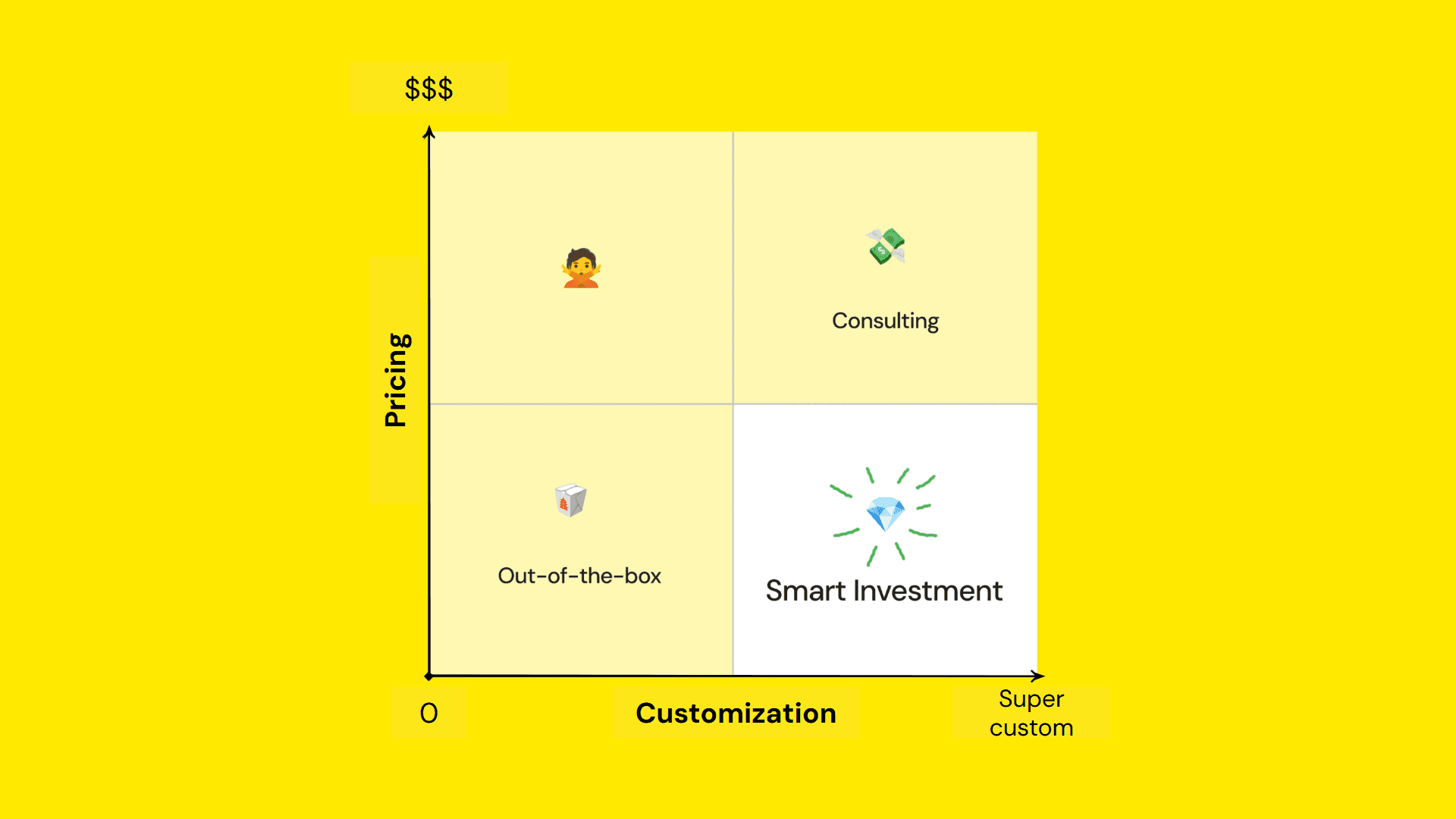
Two factors on deciding on revit templates
When deciding whether to build, buy, or invest in a template, two factors matter most: investment and customization. Most options fall somewhere within these 4 categories:
1 - The Premium Black Box
Significant investment. No customization.
Expensive doesn’t always mean effective. Very few firms actually need — or can sustain — a heavily engineered template. Many firms end up with a system they did not help shape and do not know how to maintain — essentially a black box.
2 - The Consulting Template
Significant investment. Highly customized.
This can work well if you have both the budget and a strong BIM leadership structure with the time to maintain it. Custom templates require oversight and updates. Without long-term ownership, even a well-built system starts drifting away from day-to-day reality.
3 - The Out-of-the-box Template
Low investment. No customization.
This is often enough for students, solo practitioners, or firms with very simple deliverables. But because it’s generic by design, it won’t reflect your BIM workflow or standards in a meaningful way. They may help you start a file, but they won’t help you scale consistent production.
4 - The Smart System 💎
Practical investment. Focused customization.
For many firms, this is the most sustainable path. It provides structure and clarity without requiring a full internal BIM team. It supports firms that know they need standards in place but don’t have the time or capacity to develop everything from scratch.
5 Reasons Revit Templates Fail
Templates don’t fail because of technology. They fail because of strategy.
Many articles about Revit template best practices focus on settings, families, or graphics. Those things matter, but long-term success depends on something bigger: system design, clear ownership, and actual team adoption.
Across firms of all sizes, we consistently see the same breakdowns when Revit templates start failing for the team.
1 - It’s treated as a file, not a system.
A template is not just a starter file. It is the foundation of your production environment. When it is edited casually, duplicated reactively, or patched project by project, the structure weakens. A strong template should guide behavior, not absorb every workaround.
2 - There is no clear ownership.
When ownership is unclear, the template slowly becomes shared territory with no steward. Updates happen randomly, standards evolve informally, and decisions go undocumented. Even a strong template loses value when no one is responsible for maintaining it.
3 - It doesn’t match your real workflow.
Many templates are built around an ideal version of how projects should run rather than how teams actually work under real deadlines. When standards do not match production reality, people create workarounds. Once those workarounds multiply, consistency disappears.
4 - It’s either overbuilt or underbuilt.
Some templates attempt to cover every possible scenario, which creates hesitation and unnecessary complexity. Others provide too little structure, forcing teams to reinvent basic decisions from project to project. The most effective templates provide enough guidance to support production without overwhelming it.
5 - Adoption is the real test.
The most polished Revit template in the world is useless if no one uses it properly. Adoption happens when systems feel intuitive and predictable. If a template creates friction or confusion, your team will bypass it, no matter how much effort went into building it.
This is why a successful template is not defined by how many line styles, hatch patterns, or loaded families it contains. It is defined by whether your team can rely on it consistently across projects, phases, and people.
Revit Template Practices That Prevent Failure
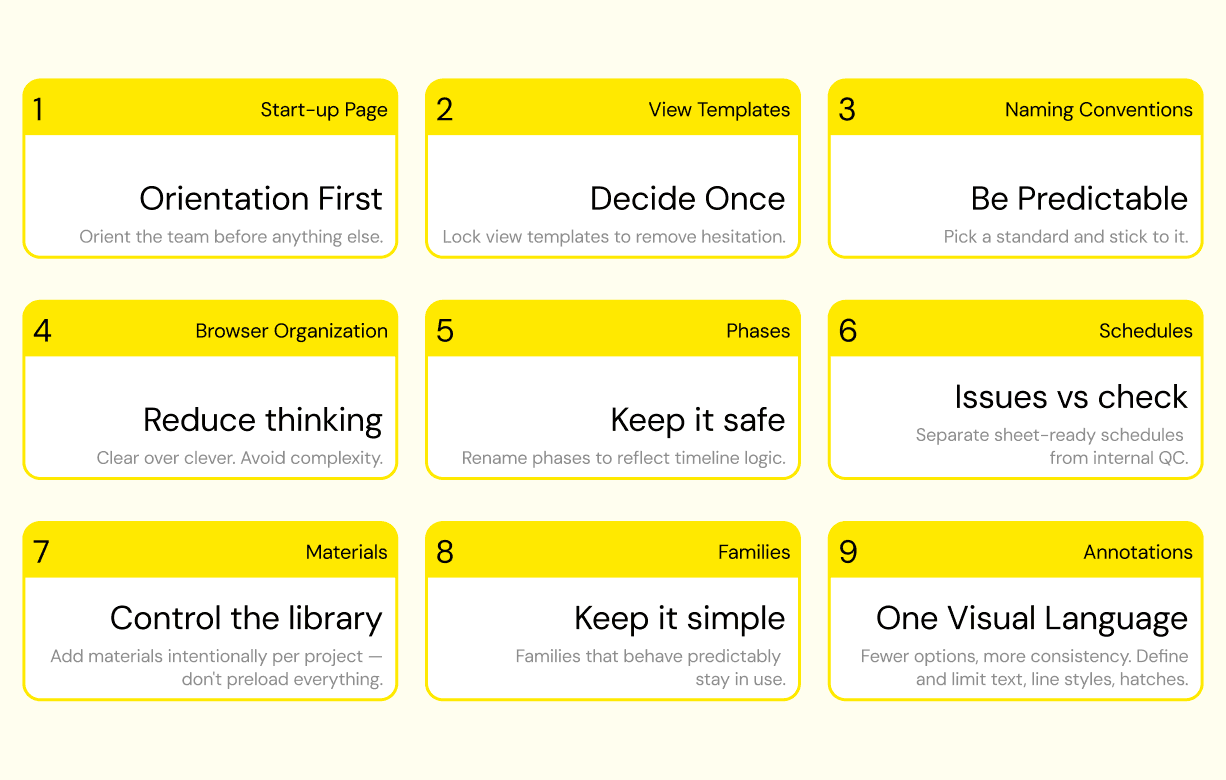
9 Revit Template Best Practices
1 - Start With a Real Startup Page
A startup page should orient the team, not just occupy space. It can include project information, client details, setup notes, responsibilities, and a short checklist for how to begin. Most importantly, it has to stay current. If the first view people open is outdated, trust in the file drops immediately.
2 - Make View Templates Obvious and Predictable
View templates are one of the most powerful tools in Revit, but only when users can apply them with confidence. If users hesitate when choosing a view template, it’s not working. Wrong template application leads to inconsistent graphics, rework, and lost time.
Plan views and elevations serve different purposes and should have separate templates. Trying to merge logic between view types only introduces compromise and eventual chaos.
Locking view templates, especially for firms with mixed experience levels, is often the right move. It prevents “creative interpretations” of standards and reinforces consistency. Advanced users can work with temporary view properties or dedicated working views when needed.
3 - Use Naming Conventions People Actually Follow
Revit naming conventions can spark endless internal debate: prefixes, suffixes, ISO alignment, capitalization rules.
If names are unclear, people create their own versions — and that is how duplicate families, inconsistent templates, and confusing browser structures begin.
We find that a clear naming structure works best with: Revit category acronym + Simple, descriptive label. Pick a capitalization standard internally. Then stick to it across teams.
For example:
FU (Furniture) – Bed with Night Tables
CA (Casework) – Base Cabinet Double Door
4 - Keep Browser Organization Clear, Not Clever
If teams spend energy searching for views instead of building models, your Revit project browser organization needs work.
In most cases, using native Revit logic and a straightforward folder structure is enough. For many firms, organization by view type provides clarity and scalability.
For highly complex, multi-disciplinary environments, discipline-based sorting may make more sense.
The key isn’t one “right” method. The key is avoiding over-engineering. Focus on setting up the clearest folder structure for the way you work.
5 - Simplify Phasing
Phasing is one of the fastest ways to introduce confusion into a template.
In many projects, a simple structure is enough: Existing, New Construction, and a future phase only if there is a real need for it.
Phases should tell a clear story:
What is existing.
What is removed.
What is added.
What remains at completion.
Based on our experience working with architecture firms, consider renaming them to reflect timeline logic: Complete, Current, Previous + Demo, etc., instead of relying solely on default Revit phase filters. The goal isn’t to reinvent the system, but to make it intuitive.
6 - Separate Your Schedules
Schedules become chaotic when documentation schedules and internal checking schedules are mixed together. Our goal is always to separate them. Have clear, sheet-ready schedules like doors, windows, rooms, and occupancy loads. Then have Work-In-Progress and Quality Control schedules for internal validation.
7 - Keep Materials Intentional
Material libraries can become cluttered very quickly: duplicated materials, slightly renamed finishes, inconsistent properties. Materials should be project-driven. Instead of preloading everything imaginable, provide a clean baseline and add materials intentionally as projects require them. Not every possible finish belongs in the template.
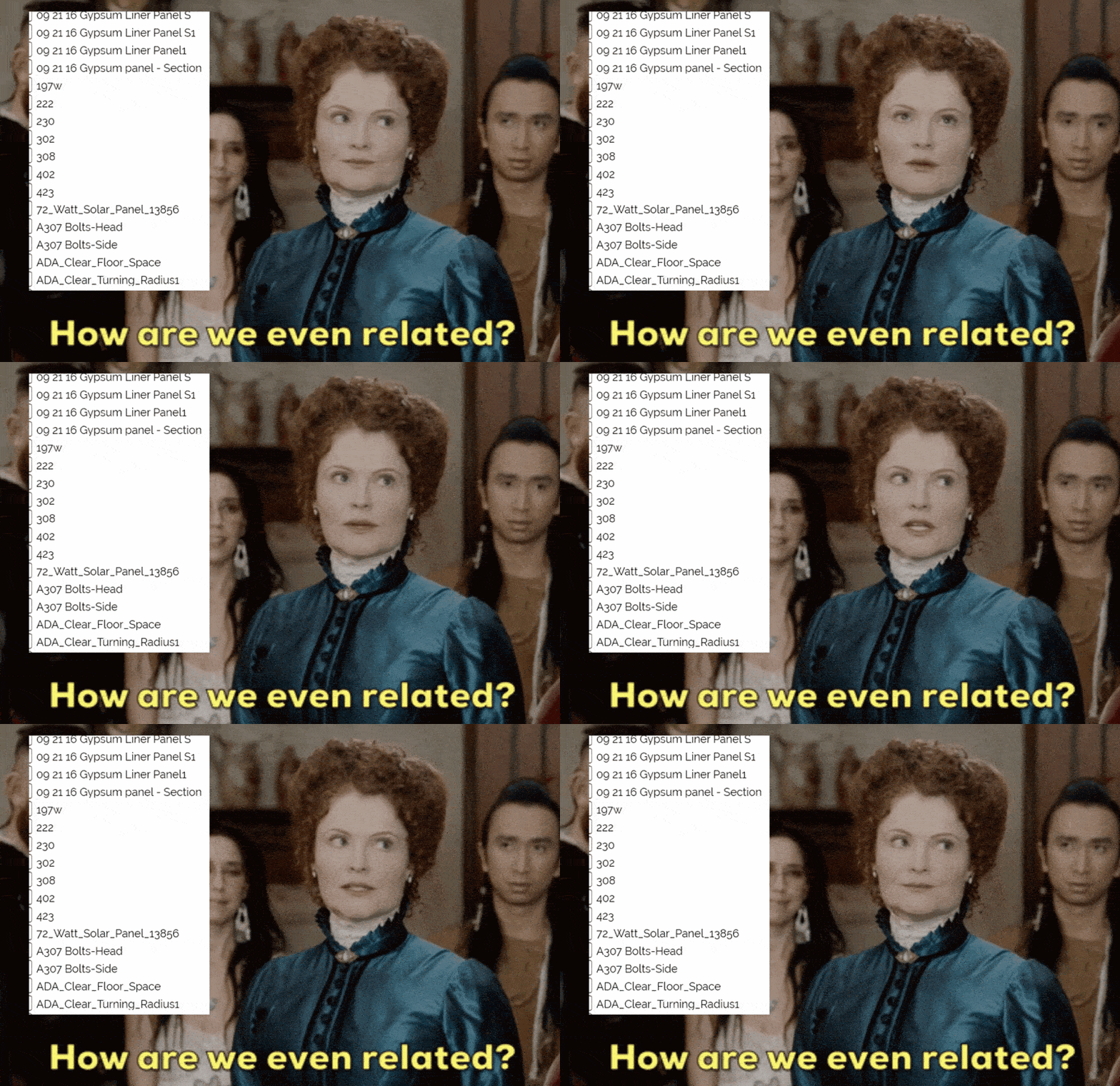
Unpredictable Families
8 - Build Families That Behave Predictably
A well-built family should:
Allow predictable type duplication
Maintain parameter logic
Scale cleanly
Avoid hidden inconsistencies
If changing a width parameter breaks the geometry, users will easily abandon the family and import another one. That’s how libraries become fragmented.
9 - Reduce Annotation Noise
Annotations are often overloaded with too many options — line styles, hatch patterns, text variations. But more options do not equal better documentation. Clear standards do. Standardize text styles. Limit line styles. Define hatch usage intentionally. When teams have fewer decisions to make, drawings become more consistent.
What Good Template Strategy Actually Does
A strong Revit template does more than clean up graphics. It improves onboarding, reduces repeated decisions, supports QA/QC, and helps teams produce documentation with more consistency and less friction.
In other words, a good template is not only a BIM tool. It is an operational tool. And it must be treated as a system.
That is also why template conversations should not stay trapped inside software settings. They should connect to how your office works, how your teams are trained, how standards are maintained, and how projects are actually delivered.
Enter: the Smart System
Over the past decade, we’ve seen what scales, what breaks, what creates friction, and what enables clarity inside firms. That led us to build a system from those lessons.
A system designed to balance structure with flexibility, reflect real workflows, and support adoption from the start. Because no matter how polished a template is, it only works if people actually use it.
If you’re rethinking your Revit standards, template setup, or BIM workflow, the right move may not be to add more complexity. It may be to build a clearer system. Explore the /slantis Revit Template system and see how you can improve your firm’s BIM standards and project delivery.